Milan Operating Mode
Introduction
Starting from firmware v1.8.0, Gen2 GigaCore switches support 'Milan Operating Mode'.
With this mode, the switch will inspect Milan traffic to determine if Milan devices in redundant mode are connected to that switch using its primary or secondary network interface. If within 1 Group, a mix of primary and secondary interfaces is detected, or if a connection is detected that wasn't expected for that group, a warning will be shown.
Learn here more about Milan-AVB.

Milan Operating Mode is only a detection mechanism to detect and inform about (possible) misconnected devices. Milan Operating Mode does not affect the Milan-AVB functionality itself.
Example
The above example consists of 2 redundant Milan devices and 2 GigaCore 10t network switches. 1 switch is dedicated to the Primary network (in Pink), the other 10t is used for the Secondary network (in Cyan "Sian"). By mistake, the primary and secondary connection of Milan device 2 are swapped. This will be detected by Milan Operating Mode detection.
Configuration
Milan mode can be configured in the web interface starting from version v1.8.0 under Group settings.
- Browse to the web interface of your GigaCore switch using the IP address.
- Go to the 'Groups | Trunks' tab
- Select 'Edit Groups'
- Make sure AVB is enabled for the group in which you would like to use Milan-AVB
- Choose your Milan operating mode using the dropdown menu:
- 'Auto': In auto mode (Milan purple), the switch will learn the expected operating mode based on the first Milan device that is detected.
- 'Primary': In primary mode (Pink primary), the switch will show warnings for all secondary connections that are detected.
- 'Secondary': In secondary mode (Cyan secondary), the switch will show warnings for all primary connections that are detected.
- 'Disabled': It is also possible to disable the Milan operating mode detection
- Apply the group settings
- Detection will only be done on group ports (access ports), not on any trunk ports.
- Different groups can be configured to different Milan Modes. (AVB has to be enabled).
Indications
Web interface
When a mismatched Milan operating mode is detected, the web interface will highlight the port on which the potential issue was detected. Hovering over that port will show the warning. There will also be a warning to the right of the device preview to inform you about a possible issue with redundant Milan network connections.
LEDs
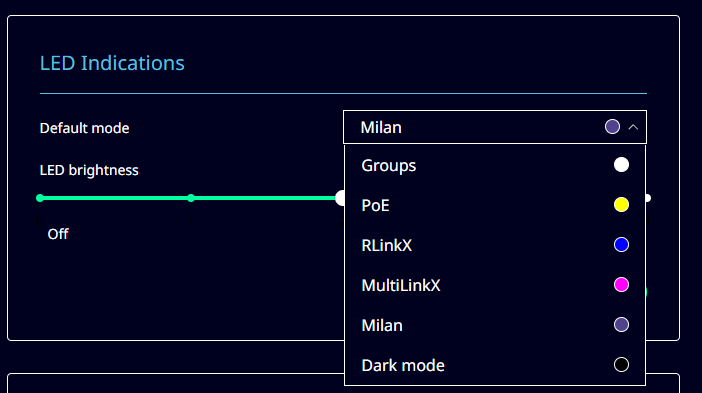
A new LED mode is available. The "Milan" mode is available under the Purple color and can be accessed using the Mode button on your GigaCore or by setting the default LED mode to 'Milan' under "Device settings" -> "LED Indications":
In this LED mode, the following per-port colors are available:
In this LED mode, the following per-port colors are available:
Port color | Explanation |
Off | Milan mode is disabled for this port or this port is a trunk port. |
Pink (solid) | Primary mode is configured for this port, or the port is using 'Auto' mode and a primary connection was detected in this group. |
Cyan (solid) | Secondary mode is configured for this port, or the port is using 'Auto' mode and a secondary connection was detected in this group. |
Red blinking with Pink | The configured or expected Milan mode does not match the detected mode on this port. Primary connection was expected, but secondary connection was detected. |
Red blinking with Cyan | The configured or expected Milan mode does not match the detected mode on this port. Secondary connection was expected, but primary connection was detected. |
Purple (solid) | "Auto" mode is configured on this port, no primary or secondary connection has been detected yet. |